galr
Highlights
- Zero-dependency architecture: single Node.js process, no external database or cache
- Advanced lightbox with slideshow, pan/zoom, keyboard shortcuts, and collection navigation
- Comprehensive organization: tags, ratings, favorites, notes, and smart filtering
- Secure sharing via time-limited token URLs with automatic session management
- Invite-only registration with QR code system for frictionless onboarding
A self-hosted private image gallery built for browsing large photo collections organized in a flexible hierarchy (e.g., category → collection → images). Runs as a single Node.js process with no external dependencies.
Architecture
Single-process design: Node.js with embedded SQLite (using --experimental-sqlite). No separate database server, no Redis, no complex orchestration.
Tech stack:
- Runtime: Node.js 24 with native SQLite support
- HTTP: Hono v4 + @hono/node-server
- Templating: Hono JSX server-side rendering (zero client framework)
- Database: node:sqlite (DatabaseSync) in WAL mode
- Thumbnails: sharp for JPEG generation with configurable size and TTL
- Styling: Vanilla dark-theme CSS
- Client JS: Single vanilla script, no bundler
Core features
Browsing
- Category list: Sort by A–Z, collection count, or last scanned date; filter by first letter or category tag; “New” badge on recently scanned categories
- Category page: Responsive cover-art grid for all collections; filter by collection tag; 1–5 star ratings displayed on cards; favorites toggle; prev/next collection navigation
- Collection page: Full image grid with click-to-open lightbox; collection-level tags, star rating, freeform notes, prev/next collection links
- Search: Live typeahead in header (categories + collections); full search results page at
/search - Favorites: Heart any category or collection; view all favorites at
/favorites - Continue watching: Recently viewed collections strip on home page with reading-position progress
- Top Picks: Collections ranked by
avg_rating × vote_count × view_countat/top - Random collection:
/randomredirects to a randomly chosen collection
Lightbox
- Navigation: Previous/next image (arrow keys or on-screen buttons)
- Slideshow mode: Animated progress bar (press S to toggle, adjustable speed)
- Pan & zoom: Scroll wheel, pinch-to-zoom, drag to pan; Z to reset
- Full-screen toggle
- Image info overlay (I): Filename, natural dimensions, file size
- Cover pin (★): Promote any image to be the collection’s cover thumbnail
- Prev/next collection jump (⏮/⏭): Navigate between collections without leaving lightbox
- Keyboard shortcuts cheat-sheet (?): Quick reference overlay
Organization
- Tags (collection-level): Add/remove tags on any collection; filter by tag on category page; tag cloud on collection page
- Tags (category-level): Add/remove tags on categories; filter categories by tag on home page
- Star ratings: Per-user 1–5 stars; average + vote count displayed everywhere
- Collection notes: Freeform markdown-safe text annotation per collection
Sharing
Shared links: Generate time-limited (7-day) token URL for any collection. Links work without login; images and thumbnails served via short-lived galr_share cookie. Related collections and editing controls hidden on shared views.
Admin
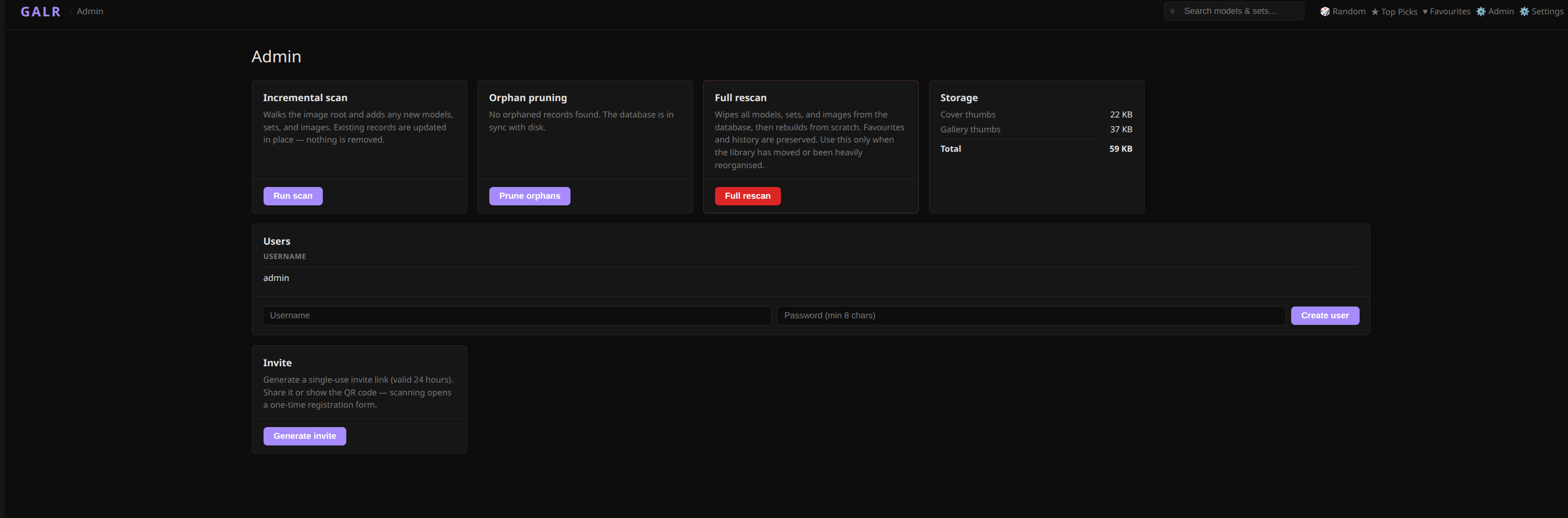
- Rescan: Incremental scan (processes only changed directories); full wipe-and-rescan option
- Orphan pruning: Removes database records for images/collections/categories whose files have been deleted
- Thumbnail cache stats: Storage usage breakdown by tier (covers vs gallery)
- User management: List all accounts, create new users, delete users
- QR invite system: Generate single-use invite token displayed as QR code; recipients visit link and register without needing existing login
Account
- Session-based login: HTTP-only cookies for security
- Change password: Available at
/settings - Invite-only registration: Admin-controlled access
Why I built it
I wanted a fast, private gallery for large photo collections that didn’t require complex infrastructure or external services. Most gallery solutions are either cloud-hosted (privacy concerns) or require multiple services (database server, cache, workers). This runs as a single process you can start and forget.
The embedded SQLite approach means deployment is trivial: copy the binary, point it at a photo directory, and it works. No connection strings, no migration runners, no orchestration complexity.
Usages: Could be to sort photos by Year -> Month -> images for example.
Design decisions
Server-side rendering: Using Hono JSX means the server renders full HTML pages. No client-side framework complexity, faster initial page loads, works without JavaScript (except for the lightbox and live search).
Embedded database: SQLite in WAL mode provides ACID transactions and concurrent reads without requiring a separate database server. For a single-user or small-team gallery, this is more than sufficient.
Vanilla client JS: A single script handles lightbox interactions, keyboard shortcuts, and live search. No build step, no dependency management, straightforward debugging.
Thumbnail strategy: Sharp generates JPEG thumbnails on first access and caches them. Configurable TTL means old thumbnails expire automatically without manual intervention.
Status
Currently running in private testing. Not yet public-facing, but functional and stable for daily use.